OpenAI Background Mode: Build Background Processing AI Systems
If your question is “how do I build a background processing AI system using OpenAI background mode?”, the answer is not just “set a request to run in the background.” Background mode solves the model-runtime part of the problem. The product still needs a job record, status model, cancellation behavior, result retrieval path, review policy, and failure-handling rules.
The first decision is not “should this be asynchronous?” It is “is this a real long-running product job, or am I hiding bad workflow design behind async language?” The easiest way to make an AI product feel unreliable is to force every task through an interactive request-response loop, even when the work obviously does not belong there. Long-running retrieval, document transforms, multi-step research, and tool-heavy workflows usually need an async operating model. That is where background mode becomes useful: it lets the product stop pretending the user should wait on work that is inherently slower, more failure-prone, or more review-sensitive.
For builders, the practical question is: what should the product own around the background response? The model provider may handle the long-running response object, but the product still owns job creation, user-visible status, cancellation behavior, review policy, retry rules, and what happens when the final output is incomplete. This page focuses on that product boundary.
Quick answer
Section titled “Quick answer”Use background mode when the task can safely finish after the live session, when it depends on longer tool chains, or when the result should be reviewed before delivery. Keep work interactive only when the user truly benefits from immediate completion. If the task can create side effects, add a human or explicit approval boundary whether it runs synchronously or not.
The minimum production shape is:
- create your own internal job record;
- start the background response;
- poll or receive status updates;
- map provider status into product status;
- store final output and review evidence;
- expose retry, cancellation, escalation, and approval decisions.
Without those pieces, background mode is only an async call. It is not yet a background processing system.
Which background-mode page should you use?
Section titled “Which background-mode page should you use?”This page is the decision boundary. Use it when you are still deciding whether a long task belongs in background mode, Batch, Flex, Priority, or an approval lane.
| Reader problem | Best next page |
|---|---|
| ”How do I build a background processing AI system?” | Build a background processing AI system with OpenAI background mode |
| ”How do polling, webhooks, status, and retries work?” | OpenAI background mode polling, webhooks, and job status |
| ”Is this really Batch instead?” | OpenAI Batch API vs background mode |
| ”What does this look like in a product?” | OpenAI background mode research report generator case study |
Build blueprint for the exact background-mode question
Section titled “Build blueprint for the exact background-mode question”If you are asking how to build a background processing AI system using OpenAI background mode, build these artifacts first:
| Artifact | What it contains | Why it matters |
|---|---|---|
| Internal job record | job ID, user or workspace scope, provider response ID, job type, created time | The product needs its own durable handle, not only a provider response |
| Runtime lane | interactive, background, batch, or approval-gated | Prevents every slow task from becoming a one-off async exception |
| Status mapper | queued, running, needs review, completed, failed, canceled, expired | Users and operators need product state, not raw API state |
| Polling or webhook worker | response retrieval, timeout policy, terminal-state handling | The job must keep moving after the browser tab or request ends |
| Result store | final output, files, citations, structured data, trace links, reviewer notes | Completion must be recoverable and auditable |
| Control actions | cancel, retry, approve, escalate, archive | Long-running jobs need safe user and operator controls |
The OpenAI API can execute the long-running response. Your application still owns the job lifecycle.
Step-by-step build path
Section titled “Step-by-step build path”Use this path when you are moving from the OpenAI documentation into application architecture:
| Step | What to build | Why it matters |
|---|---|---|
| 1. Classify the workload | Decide whether the task is interactive, background, batch, or approval-gated | Prevents every slow request from becoming a custom exception |
| 2. Create an internal job | Store job ID, user scope, job type, provider response ID, and submitted input summary | Gives the product a durable object to track |
| 3. Start background execution | Call the Responses API with background execution for jobs that can finish later | Keeps long-running model work outside the live request path |
| 4. Poll and map status | Translate provider status into product terms such as queued, running, needs review, failed, canceled, or completed | Users and operators need workflow state, not raw provider state |
| 5. Store the result | Save final output, files, citations, tool evidence, reviewer notes, and cost metadata | Completion must be auditable and recoverable |
| 6. Add controls | Define cancellation, retry, review, escalation, and expiration behavior | Long-running work fails differently from short chat responses |
If you only need bulk offline processing, compare this with Batch before building a user-facing background-job layer.
The exact build decision most teams miss
Section titled “The exact build decision most teams miss”The reader problem behind this topic is usually not academic. A builder is trying to decide whether a long-running AI feature should be a normal API request, a background response, a batch job, or a full queue-backed workflow. The wrong answer creates expensive symptoms later:
| Symptom | Usually means | Better design direction |
|---|---|---|
| Users stare at a spinner for multi-minute work | The product is forcing a job workflow through an interactive lane | Background mode plus product-owned job status |
| Support cannot tell whether a task is still running | Provider status is not mapped into product status | Internal job table and operator dashboard |
| The task finishes but nobody trusts the result | Completion was confused with review | Add a review or approval state before delivery |
| Long jobs retry unpredictably | Retry rules live only in client code | Move retry, cancellation, and failure policy server-side |
| Every async feature becomes a custom exception | Runtime lanes are not standardized | Define interactive, background, batch, and approval lanes |
For most production teams, the deciding question is: does one user or workflow care about this specific job after the request ends? If yes, background mode belongs inside a durable job design. If no, and the workload is many independent records, Batch may be the cheaper and cleaner path.
Why this matters now
Section titled “Why this matters now”OpenAI now documents background mode and longer-running agent patterns explicitly instead of treating all model work as one synchronous surface. That matters because the product decision is no longer just “call the model.” It is “which runtime lane fits the task?” Teams that answer that early build calmer products and cleaner support boundaries.
Official platform signals checked June 1, 2026
Section titled “Official platform signals checked June 1, 2026”| Official source | Current signal | Why it matters |
|---|---|---|
| OpenAI background mode guide | Background mode runs long tasks asynchronously, lets developers poll response objects for status, and exists to avoid timeouts and connectivity failures on multi-minute work | The product needs a status, retrieval, retention, and cancellation model around the provider response |
| OpenAI Responses API reference | The Responses API includes a background option for running a model response in the background | Background execution should be designed as a runtime lane, not a UI workaround |
| OpenAI webhooks guide | Webhooks can notify systems when a background response completes | Teams can choose polling, webhooks, or both depending on reliability and operations needs |
| OpenAI built-in tools guide | Tool-connected workflows are central to the modern API surface | Longer tasks are often longer because tool orchestration, retrieval, or file work is involved |
| OpenAI Batch API guide | Batch is documented for large asynchronous groups of independent requests with a separate completion model | Batch should not be confused with one tracked product job |
The important constraint is that the official runtime capability does not remove product ownership. Your application still owns user-visible state, internal audit trails, approval policy, and what happens when a job fails after the original session is gone.
The Responses reference also exposes cancellation for background responses. That detail matters operationally: if a product lets users start long-running work, it should also define who can cancel it, what cancellation means for partial artifacts, and how a canceled job appears in audit logs.
The visitor intent this page should satisfy
Section titled “The visitor intent this page should satisfy”A visitor usually arrives here with one of three jobs to do:
| Visitor question | What this page should help them decide | Better next step if they need implementation detail |
|---|---|---|
| ”Should this long task use OpenAI background mode?” | Whether the work is one tracked product job that can finish after the live request | Move to the implementation guide after the runtime lane is chosen |
| ”Is this the same as Batch?” | Whether the workload is one job or many independent deferred requests | Compare Batch API vs background mode |
| ”What do I still have to build?” | Job state, polling or webhooks, result storage, review, cancellation, and recovery | Use the job lifecycle checklist below before writing code |
The page is valuable only if it prevents a wrong architecture choice. A reader should leave knowing whether background mode is the right execution lane and what their own application must still own.
Which tasks belong in background mode
Section titled “Which tasks belong in background mode”Background mode is a better fit when the task includes one or more of these:
- document analysis across large files,
- report generation that chains retrieval, reasoning, and formatting,
- long-running web or file research,
- code or data jobs that are not user-facing in real time,
- support or operations flows that should draft first and publish only after review.
These are not slow because the model is bad. They are slow because the workflow is actually multi-step.
What your application still needs to build
Section titled “What your application still needs to build”Background mode should sit inside a product-owned job system. The minimum implementation usually needs:
| Product layer | What it should do | Why it matters |
|---|---|---|
| Job creation | Create an internal job before calling the model | Users and support teams need a durable object to track |
| Provider mapping | Store the OpenAI response ID and runtime lane | Engineers need to connect product state to provider state |
| Status translation | Map provider status to product terms like queued, running, review, failed, canceled | Product status should describe what users and operators can do next |
| Result storage | Store final text, structured output, files, citations, traces, and reviewer notes | A completed provider response is not enough for an auditable workflow |
| Review policy | Decide which job classes can auto-complete and which need approval | Background completion must not become unauthorized action |
| Recovery rules | Define retry, cancellation, expiration, and escalation behavior | Long-running work fails differently from short chat responses |
This is the difference between using background mode and building a background processing AI system.
Which tasks should stay interactive
Section titled “Which tasks should stay interactive”Keep the workflow interactive when:
- the user is actively steering the result,
- the answer is short and can complete within a normal product wait time,
- tool use is narrow and fast,
- or the primary value is conversational responsiveness rather than background completion.
Do not move work async just because the system is architecturally elegant. Move it async when the user experience and operational control genuinely improve.
The hidden cost of forcing async work into live UX
Section titled “The hidden cost of forcing async work into live UX”When teams keep long-running work in an interactive lane, they usually inherit:
- spinner fatigue and abandoned sessions,
- unclear timeout behavior,
- partial results with no stable handoff,
- poor failure messaging,
- and operators who cannot tell whether a job is still running or silently failed.
That is not only a UX problem. It also damages trust, support load, and incident diagnosis.
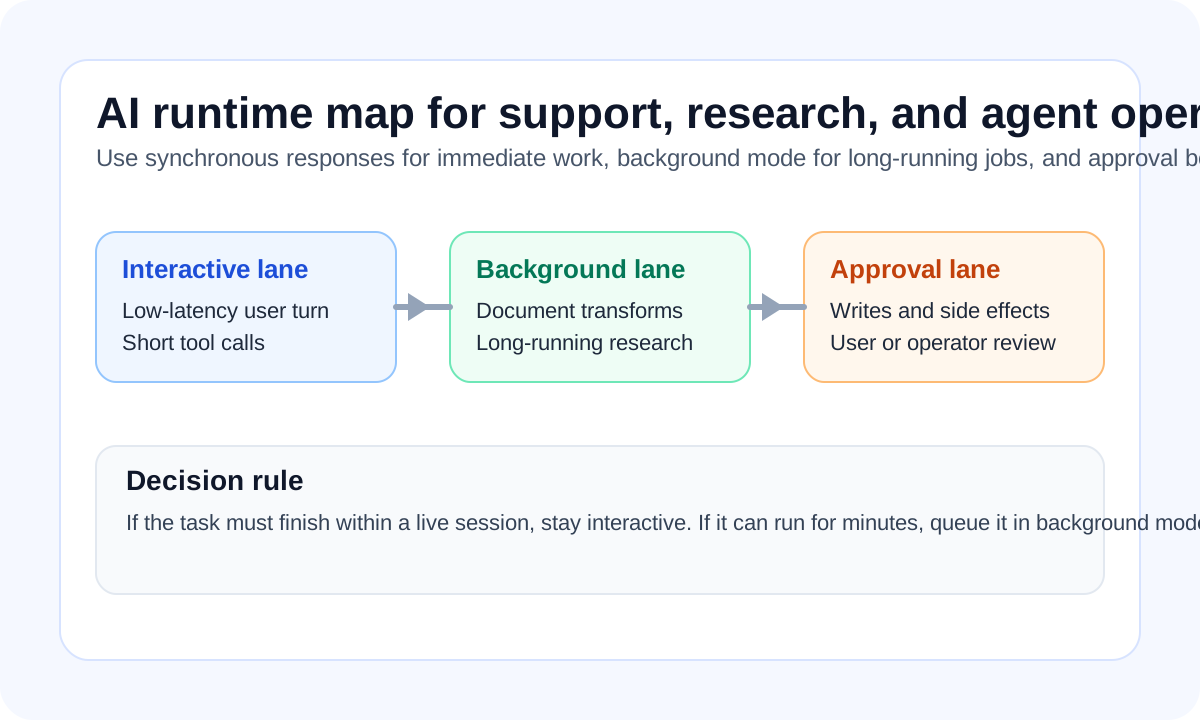
A three-lane operating model
Section titled “A three-lane operating model”The cleanest runtime model usually looks like this:
- Interactive lane for short answers and fast tool calls.
- Background lane for long-running jobs and research-grade tasks.
- Approval lane for anything that can change state, spend money, or affect customers.
This matters because async work and autonomous work are not the same thing. A background task can still be tightly bounded and reviewable.
When approval belongs in the async path
Section titled “When approval belongs in the async path”Approval is most important when the job can:
- send customer-facing communication,
- change records,
- trigger purchases or credits,
- write into production systems,
- or publish content without a human sanity check.
That is why the best async systems are not “fully autonomous.” They are designed to finish work, surface status, and stop before consequential action.
Background mode FAQ
Section titled “Background mode FAQ”Do I still need my own job table?
Section titled “Do I still need my own job table?”Yes. Background mode gives you a provider response that can run beyond the live request path. It does not replace your product’s job table, user permissions, support visibility, billing attribution, or review state.
Is OpenAI background mode the same as Batch API?
Section titled “Is OpenAI background mode the same as Batch API?”No. Background mode is for one tracked product job that may take longer than a normal synchronous response. Batch is for many independent deferred requests that can be processed as a bulk workload.
Should a background job write to production systems automatically?
Section titled “Should a background job write to production systems automatically?”Only if the write scope is narrow, reversible, logged, and already approved by policy. For customer-facing, financial, security, permission, deployment, purchase, or deletion actions, background completion should normally mean “ready for approval,” not “already executed.”
What status should users see?
Section titled “What status should users see?”Use product language: queued, running, needs review, completed, failed, canceled, or expired. Raw provider statuses are useful for engineers, but they are usually too narrow for users and operators.
A practical implementation rule
Section titled “A practical implementation rule”Use background mode when all three are true:
- the result still has value if it arrives after the current session,
- the task depends on several steps or potentially slow tool calls,
- the product can show status, retry behavior, and final result retrieval cleanly.
If any of those are false, the workflow may still belong in the live lane.
When to use the deeper implementation guide
Section titled “When to use the deeper implementation guide”This page is the decision boundary. If the decision is already made and you need a build plan, use the implementation guide for building a background processing AI system with OpenAI background mode.
That guide goes deeper on:
- internal job records;
- status polling and recovery;
- cancellation and expiration behavior;
- review gates;
- cost-per-completed-job tracking;
- and how to keep provider state separate from product state.
Failure modes to avoid
Section titled “Failure modes to avoid”The common design mistakes are:
- hiding async work behind a fake synchronous experience,
- not showing job status or completion state,
- letting background tasks write directly without review,
- and failing to distinguish “still running” from “failed and needs intervention.”
These are the real reasons async AI products feel brittle.
Implementation checklist
Section titled “Implementation checklist”The design is healthy when:
- the team can name which jobs belong in each runtime lane,
- status and failure states are visible to the user or operator,
- approval boundaries are explicit for consequential actions,
- and evaluation covers not just answer quality but timeout, retry, and completion behavior.
That is when background mode becomes operating leverage instead of architectural theater.